
Help · For care aides and nurses
Recording vital signs
Enter only what you measured, in the units shown. If a reading is outside the limits the nurse set for that resident, MapSorix Care tells you straight away.
Who is due
The Today screen lists residents due for vital signs, based on how often the nurse set for each one, or every day if it isn’t set.
Record a set of readings
- Open the resident and tap Vitals.
- Fill in the boxes for what you measured, and leave the rest empty.
- Under Time of measurement, choose just now or up to 2 hours ago.
- Add a note if something needs explaining, then tap Save readings.
If a number is far from what is usually recorded, such as a temperature of 44 °C, MapSorix Care asks you to check it before saving. Tap Go back to fix it, or Save anyway if it is what you measured. A number no reading can be, such as 98.6 °C, isn’t saved at all.
| Reading | Unit |
|---|---|
| Blood pressure, top and bottom numbers | mmHg |
| Pulse | beats a minute |
| Temperature | °C |
| Breathing rate | breaths a minute |
| Oxygen saturation | % |
| Weight | kg |
| Blood glucose | mmol/L |
| Pain | 0 (none) to 10 (worst) |
When a reading is outside the limits
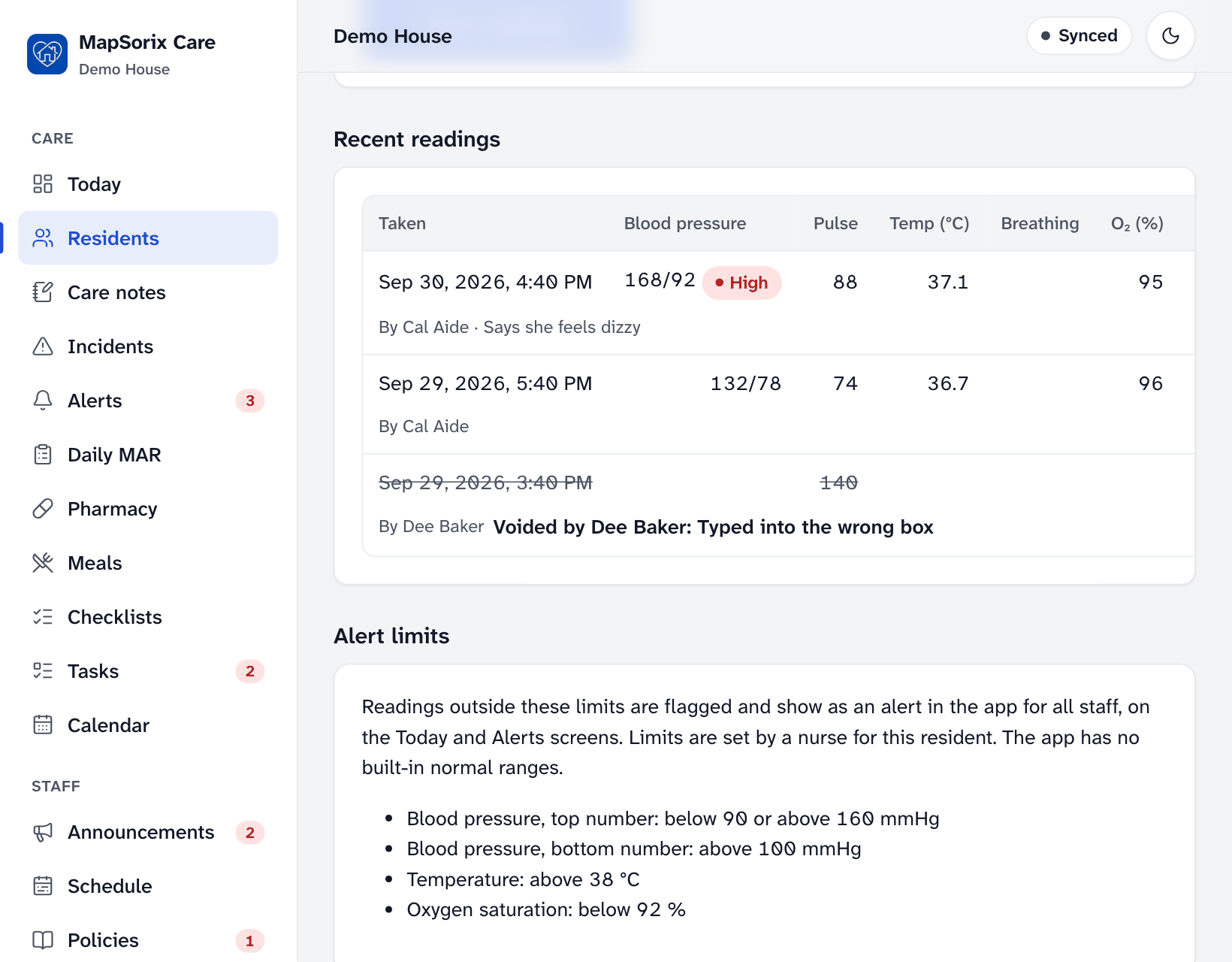
MapSorix Care shows which reading is outside the limits and says Notify the nurse immediately. The reading is labelled High or Low, and an alert goes on the nurse’s Alerts list. Tell the nurse in person as well: the alert doesn’t replace that.
Good to know
- MapSorix Care has no built-in normal ranges. A nurse or administrator sets each resident’s limits with Change alert limits, and readings are only flagged against those.
- Entered something wrong? Tap Void (entered in error) and give the reason. See Correcting a mistake.
More help
- Signing in on a care tablet
- The medication pass
- Correcting a mistake
- Writing a care note
- When the internet drops
- Recording vital signs
- Filing an incident report
- Clocking in and out
- Care plans and assessments
- The family portal
- Your pharmacy and the pharmacy portal
- The pharmacy portal, for pharmacies
- Staff, tablets and support access
- Resident billing
- Getting ready for an inspection
All help · Questions: care@mapsorix.com or (306) 400-1800, Monday to Friday, 9 AM to 5 PM Saskatchewan time.